
Troubleshoot your device
Troubleshoot Your SitnStand Device
If your SitnStand isn't working as expected, most issues can be resolved in a few minutes. Find your problem below for step-by-step fixes. If these steps don't resolve the issue, our customer service team is happy to help — see the Contact section at the bottom of this page.
Before You Start
Have the following ready before troubleshooting or contacting support:
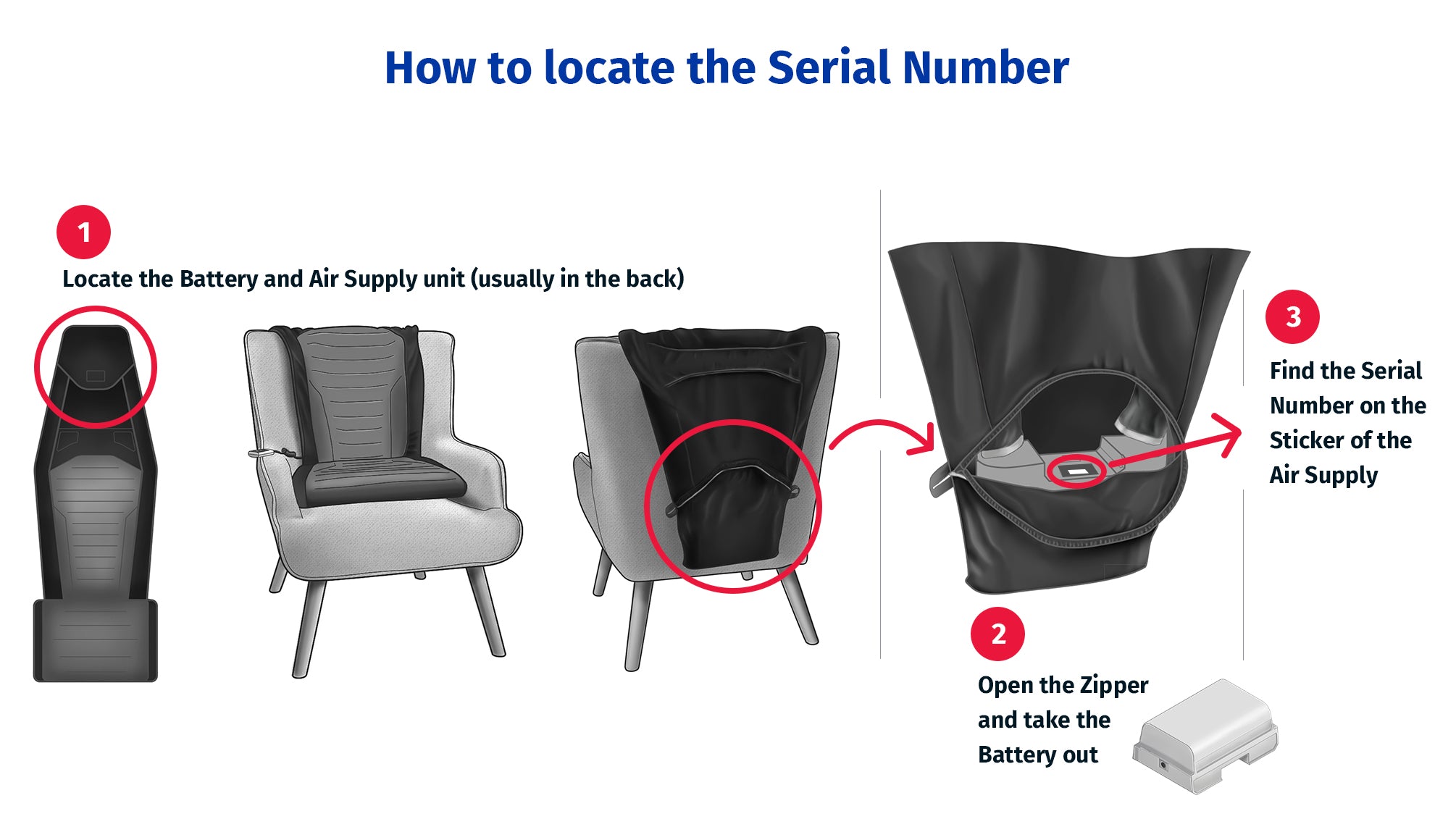
- Your device serial number (see image below for where to find it)
- Your order number if purchased from us or proof of purchase
- A clear description of the problem and when it started
First — Is the Light on Your Remote Flashing Red?
If the light on your remote is flashing red, this usually means the device just needs a quick reset before you submit a warranty claim:
- Press the top and bottom buttons on the remote simultaneously and hold them down until you hear the motor click.
- Release both buttons. The device should now respond normally.
- Try operating the device again.
If the reset solved the problem, you're all set. If the flashing red light continues or the device still doesn't respond, please fill out the warranty service request form below.
The Device Won't Inflate (Won't Lift Me Up)
- Check the battery. If the indicator light on the device is blinking yellow, the battery may be low or empty. Charge the battery for 4-5 hours using the original charger, or swap in a spare charged battery.
- Check connections. Make sure the battery is fully seated in its slot (slide it firmly into place until you feel it click).
- Check for blockage. Make sure the device is fully unfolded and that no straps or fabric are pinching the air chambers.
- Press the Up button one layer at a time. Each press inflates one chamber. If you press too rapidly, the device may pause briefly between layers.
If the device still won't inflate after these steps, please contact us.
The Device Won't Deflate (Won't Let Me Sit Down)
- Check the battery. A very low battery can prevent the deflation valve from operating. Charge the device battery and try again.
- Press the Down arrow one layer at a time. Each press releases one chamber.
- Check positioning. Make sure the device is flat and centered on the seat. A tilted device may not deflate evenly.
If the device still won't deflate, please contact us before forcing it.
The Battery Won't Charge or Doesn't Last
- Use only the original charger. Third-party chargers can damage the battery and void the warranty.
- Check that the charger is plugged in. Confirm the wall outlet has power and the connections are secure on both ends.
- Check the charger indicator light. Red means charging in progress; green means fully charged. If you see no light on the charger, the charger or outlet may be the problem — try a different outlet first.
- Charging time: a full charge takes 4-5 hours. Battery life is up to 80 lifts per charge. If your battery is providing significantly fewer lifts than this, the battery may be reaching the end of its lifespan.
- Store the charger in a dry place. Moisture damage to the charger can prevent proper charging.
If the battery still won't charge or holds significantly less than 80 lifts per charge, please contact us — your battery may be eligible for warranty replacement.
Strap or Placement Problems
- Make sure all straps are fastened tightly before use — but not so tight that they restrict inflation.
- Confirm the device is centered on the seat. A device that's off-center can shift during inflation.
- Check the maximum weight capacity — 400 lbs (180 kg). Exceeding this weight limit can damage the device and is unsafe.
- Do not use on rolling chairs or any chair that isn't stable.
- For Compact models make sure the blue pipping are parallel and not twisted. If they are twisted it will kink the tubes inside the device and will block the airflow.
Indicator Lights — What They Mean
On the device battery / charger:
- Red light = charging in progress
- Green light = fully charged
- No light = check power, charger, or connection
On the remote control:
- Red Flashing quickly = error mode, restart device as explained below.
- Green Flashing slowly = standby mode
- Green Flashing quickly (about 5 per second) = working mode, normal during use
- Yellow Flashing = battery needs recharge
Still Need Help?
If none of the steps above resolved your issue, please fill out the form below.
Have your serial number, proof of purchase, and a description of the problem ready when you contact us.
Phone: +1 833-773-7360
Email: info@sitnstand.com
Business Hours: Sunday to Thursday, 8am to 5pm EST
